If you have an external disk connected to your Windows and you try to access it via wsl, you will probably find nothing.
It is necessary to mount it manually:
mount -t drvfs d: /mnt/exdrive
If you have an external disk connected to your Windows and you try to access it via wsl, you will probably find nothing.
It is necessary to mount it manually:
mount -t drvfs d: /mnt/exdrive
I migrated my flutter project to a new computer and after a while I realized that it is not building because of a strange CMake error.
How I fixed it?
flutter clean
then I deleted windows directory under my project
flutter create .
flutter run
And that is all!
I've tried to run some docker images from vulnhub - they have images with known CVEs like log4j etc.
It is easy, just run docker-compose up and you have it. Unfortunately I recieved a lot of errors and the reason was: "unable to allocate file descriptor table - out of memory". It is caused by changed ulimits in system.conf.
How to fix it?
You have to limit docker and it is necessary just to add following lines to docker compose file:
ulimits:
  nproc: 65535
  nofile:
    soft: 26677
    hard: 46677
Then everything will work again.And if you'd like to run it directly from the commandline just run:
docker run --ulimit nproc=65535 --ulimit nofile=26677:46677 -d <your_image>
I love this LCD. It is large enough and I can connect my computer via USB-C. Everything is connected to the monitor so my desk is relatively clean of cables. But then one day I updated the firmware and installed Dell Monitor Manager.
After a while, I realized that if the monitor goes to sleep mode, I can no longer connect it to it. The only way was to physically remove the electricity cable and start LCD again.
One month later I decided to contact support. The next day I had a call and we talked about the options. I updated the firmware and updated the drivers. It did not help.
In the end, I removed Dell Monitor Manager and realized that it was caused by it! Now my monitor is great again and I don't have to restart it again and again.
Lessons learned: If something is working, don't touch it!
Kdo to zkoušel, ten ví, že to je noční můra. V P5idat nebo ubrat programy je volba zašedlá a z klienta samotného také nic neuděláte. Jak na to?
Otevřete si klienta a odemkněte vlevo dole nastavení.
Následně si vpravo nahoře klikněte na další zámek a nastavte si heslo. Po tomto kroku Klienta ukončete.
Po znovuspuštění běžte do konfigurace, zadejte heslo a následně otevřete Přidat nebo ubrat programy.
Hurá, volba je již klikatelná.
Důvod? FortiNet klient čeká, než bude nastavení odemčeno pomocí hesla. Když tam žádné heslo zadané nemáte, odinstalovat ho nemůžete...
I installed GVM to Kali and tried to create a new config. I failed with strange error that config is not found.
After some investigation I've realized that I have to run gvm-feed-update and check if it succeeded.
Then go to https://127.0.0.1:9392/feedstatus and check the status. When everything is ready you can start using GVM.
Install Xming X server.
Open WSL and set up the DISPLAY variable:
export DISPLAY="`sed -n 's/nameserver //p' /etc/resolv.conf`:0"
try to run some X application, for example xclock
If an error will be shown, check the Xming log
You will find there:
client 4 rejected from IP XXX.XXX.XXX.XXX
Go to c:\Program Files (x86)\Xming\
Edit X0.hosts and add IP address from the error log above
Restart Xming
What you should do when you have Sonar in docker and you can't remember, which password you have for your admin user? If you use internal H2 database it is not so easy...
First of all connect to your docker container:
docker exec -it container_id /bin/bash
Then run following commands to connect to H2 database:
cd /opt/sonarqube/lib/jdbc/h2
java -cp h2-1.4.199.jar org.h2.tools.Shell
You will be asked to fill following values:
URL jdbc:h2:tcp://localhost:9092/sonar
Driver org.h2.Driver
User [none]
Password [none]
Then just change your admin password:
UPDATE users SET crypted_password = '$2a$12$uCkkXmhW5ThVK8mpBvnXOOJRLd64LJeHTeCkSuB3lfaR2N0AYBaSi', salt=null, hash_method='BCRYPT' WHERE login = 'admin'
Command is simple and you can find it in GUI - click on attach:
mount -t efs -o tls fs-some_id_of_efs:/ efs
Of course you have to create efs directory first - typically in /mnt/ directory.
It is quite simple, use Amazon linux image and install:
sudo yum install amazon-efs-utils nfs-utils
And thats all...
If you have standard WSL2 Ubuntu then you will be able to install docker compose version ~ 1.25. This is not enough for newer scripts.
It is necessary to do following steps:
mkdir -p ~/.docker/cli-plugins/
curl -SL https://github.com/docker/compose/releases/download/v2.2.3/docker-compose-linux-x86_64 -o ~/.docker/cli-plugins/docker-compose
chmod +x ~/.docker/cli-plugins/docker-compose
And you are there :)
docker compose version
I'm using Jenkins pipeline and inside I've tried to set up a combobox with available branches. User can pick one and it will be build.
Easy? No.
I've recieved an error: stderr: fatal: Couldn't find remote ref refs/heads/${BRANCH}
I've found solution after some hours, just untick the Lightweight checkout box at the end of git area in the configuration.
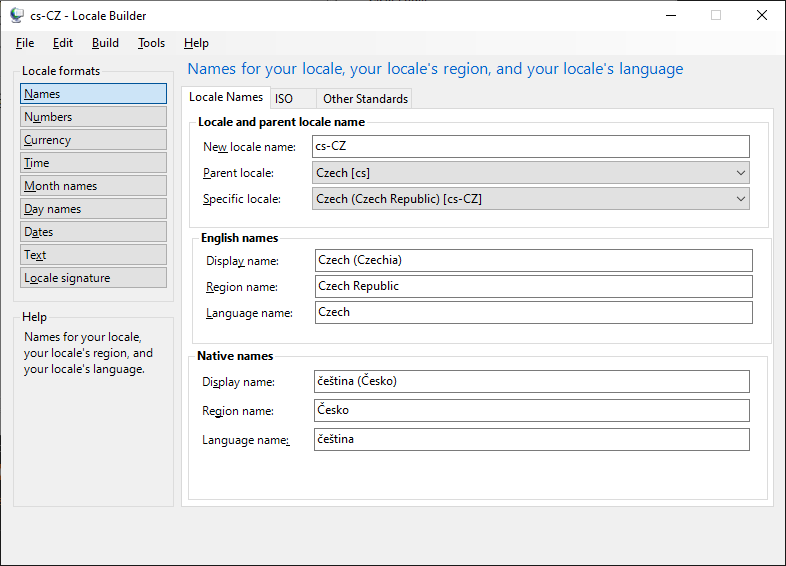
I have on my old external drive some PostgreSQL data directory. What is inside? Lets install old PostgreSQL 9.4 and check it out.
But it is not starting :( In the Event Viewer I have:
2022-03-15 09:05:29 CET LOG: invalid value for parameter "lc_time": "Czech_Czech Republic.1250"
It is not possible to mount flash disc directly to the sandbox instance, but you can use following hack:
Create a file named sandbox.wsb
Put following text inside:
<Configuration>
<VGpu>Default</VGpu>
<Networking>Disable</Networking>
<MappedFolders>
<MappedFolder>
<HostFolder>D:\Public</HostFolder>
<ReadOnly>false</ReadOnly>
</MappedFolder>
</MappedFolders>
<LogonCommand>
<Command>explorer.exe C:\users\WDAGUtilityAccount\Desktop</Command>
</LogonCommand>
</Configuration>
Then just doubleclick this file and Sandbox with attached USB is here ;)
Some days ago I've found my old Raspberry Pi3+ and decided to play a little bit with it. First step was to flash to the SD card newest Kali. I've did it with balena Etcher flasher and it booted like a charm.
After a while I've realized that bluetooth is not working. Nothing was found:(
I've enabled bluetooth service and hciuaart:
modprobe btusb # add the btusb module to the kernel
systemctl enable bluetooth.service
systemctl enable hciuart
But still nothing...
But then I've checked /boot/config.txt and edited lines in the following way:
# Uncomment some or all of these to enable the optional hardware interfaces
dtparam=i2c_arm=off
#dtparam=i2s=on
dtparam=spi=off
dtoverlay=miniuart-bt
dtoverlay=pi4-enable-bt
Při spuštění jednoho staršího JAVA programu na mě vyskočila tato hláška: Invalid version number: Version number may be negative or greater than 255
Po drobném zkoumání jsem zjistil, že nikdo pravděpodobně nepředpokládal, že minor verze JAVA se někdy dostane přes 255 a došlo ke krásnému přetečení :)
Řešení? To nejrychlejší je spustit to se starší JAVA verzí.
HKEY_LOCAL_MACHINE\System\CurrentControlSet\Control\Lsa\Kerberos\ParametersThen you have to create jaas config (jaas.cfg) file with following content:
Value Name: allowtgtsessionkey
Value Type: REG_DWORD
Value: 0x01

