Zobrazují se příspěvky se štítkemwindows. Zobrazit všechny příspěvky

pátek 21. října 2022

How to run X11 applications from WSL2

 Install Xming X server.

Open WSL and set up the DISPLAY variable:

export DISPLAY="`sed -n 's/nameserver //p' /etc/resolv.conf`:0"

try to run some X application, for example xclock

If an error will be shown, check the Xming log

You will find there:

client 4 rejected from IP XXX.XXX.XXX.XXX

Go to c:\Program Files (x86)\Xming\

Edit X0.hosts and add IP address from the error log above

Restart Xming

úterý 15. března 2022

Old PostgreSQL 9.4 is not starting

I have on my old external drive some PostgreSQL data directory. What is inside? Lets install old PostgreSQL 9.4 and check it out.

But it is not starting :( In the Event Viewer I have:

2022-03-15 09:05:29 CET LOG:  invalid value for parameter "lc_time": "Czech_Czech Republic.1250"

What to do next? Check this guide - https://dba.stackexchange.com/questions/188837/postgresql-9-5-wont-start-after-windows-10-fall-update

  1. Download https://www.microsoft.com/en-us/download/details.aspx?id=41158
  2. Install it
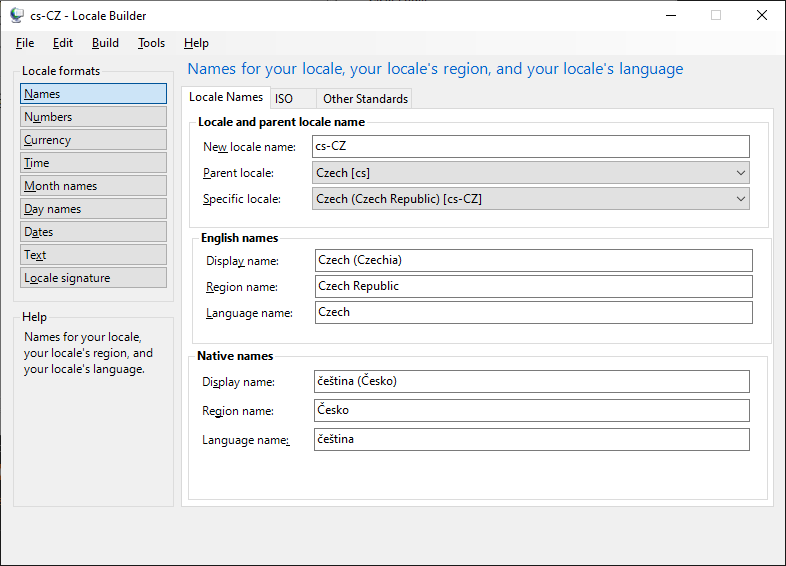
  3. Run the Locale Builder 
  4. Create new locale with Czech locale (cs-CZ) and cs-CZ
  5. Change the Region name from Czechia to Czech Republic.
  6. In the menu click on: Build - Build Locale Installer
  7. Install the locale
  8. Start your PostgreSQL!


pátek 11. března 2022

How to mount USB to your Windows Sandbox

 It is not possible to mount flash disc directly to the sandbox instance, but you can use following hack:

Create a file named sandbox.wsb

Put following text inside:

<Configuration>

<VGpu>Default</VGpu>

<Networking>Disable</Networking>

<MappedFolders>

<MappedFolder>

<HostFolder>D:\Public</HostFolder>

<ReadOnly>false</ReadOnly>

</MappedFolder>

</MappedFolders>

<LogonCommand>

<Command>explorer.exe C:\users\WDAGUtilityAccount\Desktop</Command>

</LogonCommand>

</Configuration> 


Then just doubleclick this file and Sandbox with attached USB is here ;)