pátek 12. srpna 2022

How to reset your SonarQube admin password in H2

What you should do when you have Sonar in docker and you can't remember, which password you have for your admin user? If you use internal H2 database it is not so easy...

First of all connect to your docker container:

docker exec -it container_id /bin/bash


Then run following commands to connect to H2 database:

cd /opt/sonarqube/lib/jdbc/h2

java -cp h2-1.4.199.jar org.h2.tools.Shell


You will be asked to fill following values:

URL jdbc:h2:tcp://localhost:9092/sonar

Driver org.h2.Driver

User [none]

Password [none]


Then just change your admin password:

UPDATE users SET crypted_password = '$2a$12$uCkkXmhW5ThVK8mpBvnXOOJRLd64LJeHTeCkSuB3lfaR2N0AYBaSi', salt=null, hash_method='BCRYPT' WHERE login = 'admin'


pondělí 20. června 2022

How to mount EFS to EC2 instance on AWS

Command is simple and you can find it in GUI - click on attach:

mount -t efs -o tls fs-some_id_of_efs:/ efs

Of course you have to create efs directory first - typically in /mnt/ directory.

It is quite simple, use Amazon linux image and install:

sudo yum install amazon-efs-utils nfs-utils


And thats all... 


středa 27. dubna 2022

Docker compose up on Windows X WSL2

 If you have standard WSL2 Ubuntu then you will be able to install docker compose version ~ 1.25. This is not enough for newer scripts.

It is necessary to do following steps:

mkdir -p ~/.docker/cli-plugins/

curl -SL https://github.com/docker/compose/releases/download/v2.2.3/docker-compose-linux-x86_64 -o ~/.docker/cli-plugins/docker-compose

chmod +x ~/.docker/cli-plugins/docker-compose

And you are there :)

docker compose version

středa 13. dubna 2022

Jenkins - Couldn't find remote ref

I'm using Jenkins pipeline and inside I've tried to set up a combobox with available branches. User can pick one and it will be build.

Easy? No.

I've recieved an error: stderr: fatal: Couldn't find remote ref refs/heads/${BRANCH}

I've found solution after some hours, just untick the Lightweight checkout box at the end of git area in the configuration.

úterý 15. března 2022

Old PostgreSQL 9.4 is not starting

I have on my old external drive some PostgreSQL data directory. What is inside? Lets install old PostgreSQL 9.4 and check it out.

But it is not starting :( In the Event Viewer I have:

2022-03-15 09:05:29 CET LOG:  invalid value for parameter "lc_time": "Czech_Czech Republic.1250"

What to do next? Check this guide - https://dba.stackexchange.com/questions/188837/postgresql-9-5-wont-start-after-windows-10-fall-update

  1. Download https://www.microsoft.com/en-us/download/details.aspx?id=41158
  2. Install it
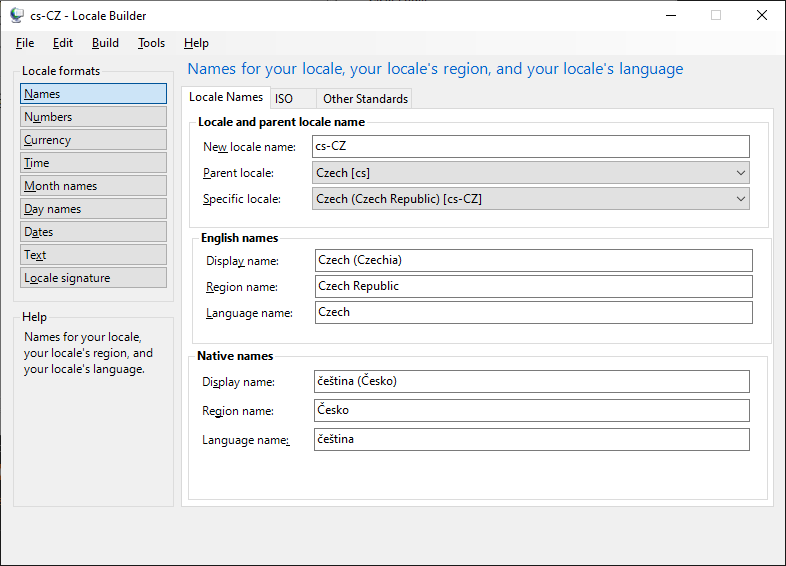
  3. Run the Locale Builder 
  4. Create new locale with Czech locale (cs-CZ) and cs-CZ
  5. Change the Region name from Czechia to Czech Republic.
  6. In the menu click on: Build - Build Locale Installer
  7. Install the locale
  8. Start your PostgreSQL!